
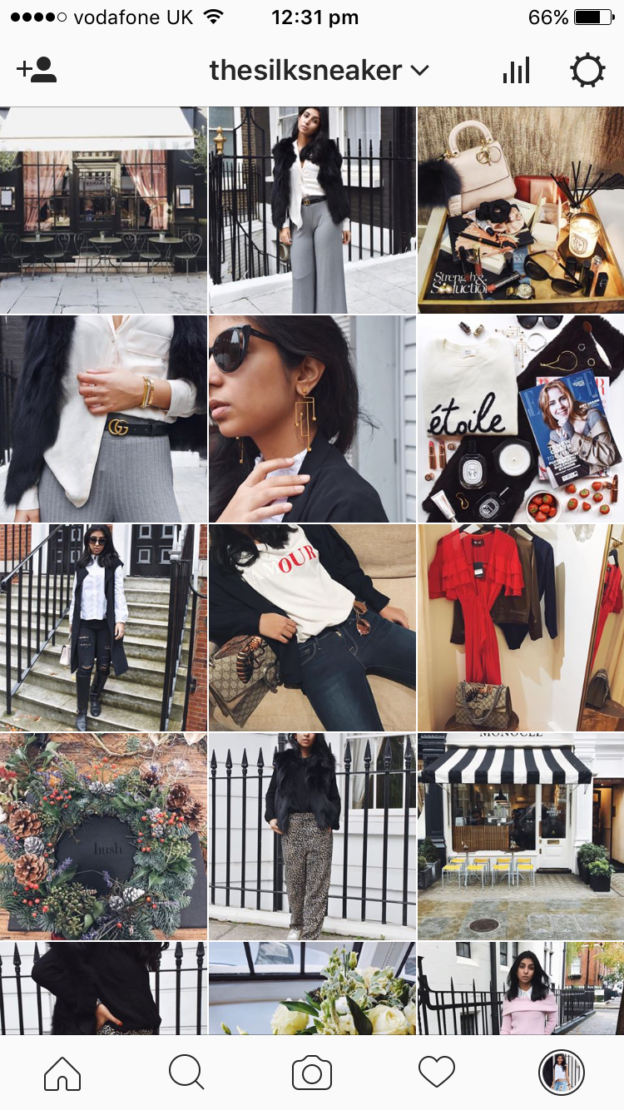
“Shloka, how do you edit your Instagram photos? What are your tips for Instagram?”
Today, I’m all about answering that question. Editing photos for Instagram is no easy feat, and although it seems like creating a perfectly curated feed of #ootds and #fromwhereIstand shots is perfectly simple, it actually requires a lot of thought and effort. You guys send so much love towards my Instagram and I wanted to return that love by sharing some Instagram tips with you today, specifically, what editing apps I use to edit photographs for my Instagram. Believe it or not, but a lot of the photos I take for my Instagram are taken on my Iphone! It’s all about creating the aesthetic you want and making sure that the photos work together to showcase that same aesthetic.


Afterlight
The first app I use is Afterlight. I love this app because it really gives you total control over tools like brightness and contrast – the two tools I like to use the most. The aim is to keep the photo looking as natural as possible so I try not to mess around with the other settings very much. If anything, I like to add a touch of blue to my shadows to just give the photo a cooler feel (I mean that in terms of temperature, not general coolness ha ha!)
The sharpen tool on Afterlight is also really great! Although this is an app you need to pay for, It’s really worth it. I don’t use any of the filters on the app but I know a lot of people love them!


Snapseed
The second app I completely swear by is Snapseed. I know you have to pay for this app but trust me, it’s worth every penny! There are two tools I use the most when it comes to Snapseed; the selective feature and the transform feature. The selective feature allows you to adjust the brightness, contrast and saturation in specific areas of your photos – so you can fix the light in one part of the photo to match the other, or you can make certain colours pop! Trust me, it’s amazing, especially when you’re taking photos on your phone!
The transform tool allows you to adjust the photo so that if it’s taken at a strange angle, you can make sure it looks straight! Give it a try and it’s a great way to fix a photo that looks amazing but you just wish was taken at a different angle!
VscoCam
Who doesn’t love Vsco? If you haven’t been using it already, I suggest downloading it ASAP. The thing with Vsco is that it is so easy to get excited by all the different filter options and allow yourself to just get a bit filter crazy. Don’t forget, the key is to keep the photo as natural as possible! What I love about Vsco is that it allows you to adjust the intensity of the filter. I tend to go for either A8 or A9, depending on the shot, and I like to keep the filter intensity as low as possible.
What’s great is that this way you can ensure all your photos in your feed are using the same filter or at least a similar filter. This is what guarantees a feed that looks cohesive and images that look great together!


Retouch
Retouch is like magic. It allows you to completely remove items in your photograph that you wish weren’t there. Annoying label on the wall behind you? Gone! Cigarettes on the ground? Gone! You just use the object removal tool to highlight or lasso the object you don’t want, and then click Go! Before you know it, it’s the object wasn’t there to start with. There’s nothing worse than silly labels and garbage on the ground to ruin a gorgeous photo!
If you’re looking for an alternative, Facetune also allows you to take out objects using it’s clone stamp tool. The only reason I like Retouch better is because you don’t need to clone stamp the object out, Retouch just does it for you! Facetune is great though to sharpen up certain parts of your image!
UNUM
Of course, your Instagram is more than just one photo – it’s about how all the photos come together in the feed. As I mentioned above, it’s all about making sure your editing is consistent and you use the same or similar filter for each photo. Even so, a lot of you have asked me how I know which photos will go together! There is a super handy app called Unum which allows you to import the photos you want to put in and see how they go together in your feed!
I love using this app because it shows you how all the new photos will go together with your existing feed and helps you plan out your next set of photos too! It also shows you everything on a white background instead of a dark one like Vsco, which really can make more of a difference than you would think!


Would you like more Instagram tips? Would you guys want to read about my flatlays or how I frame other shots? Let me know!
